Emails with embedded Links and Buttons
Emails can contain all sorts of links and buttons. When your mouse changes from the pointer to something else like a hand
 then you are on a link or a button. If you click, something will happen. If the email is from someone wanting to get into your system, something BAD can happen.
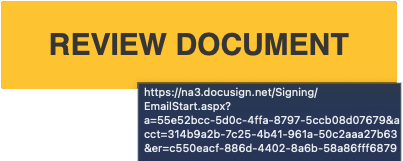
The above is the button that was in the email sent to you recently. If you place the mouse on it with out clicking (Hover) After a couple of seconds it will change and show the hidden link inside the button.
Notice the IP address 3.148.130.74? If you see an address like this never click. Legitimate email links have domain names like msstx.us, google.com, netflix.com etc.
Ok really getting in the weeds but this is important. There can be a bunch of weird stuff when you hover over a button or link. Below is an actual docusign link. But we need to find the real DOMAIN name. It will be 1 word plus a .net, .com, .us or some other ending.
Here is the trick. Tune out everything you see and look for the first single “/”. In the above example it is between the .net and Signing. Now go to the left and look at only the first 2 words (periods are the spaces “.”) , in this case it is https://na3.docusign.net/Signing/EmailStart.aspx?a=5ec326c3. The DOMAIN name us docusign.net. It is important to know that docusign.net, docusign.com and docusign.us are 3 completely different locations. Sort of like First ST, First Ave are completely different roads.
Thats all you have to look for. With this trick you can clearly see the destination (DOMAIN) is docusign.net
Don’t fall for a http://docusign.net.forms.ru/Emailsart?apx5. If you try the method of finding the destination from above, you’ll discover this link goes to “forms.ru/”, a Russian website. Nothing at all to do with docusign even though docusign.net is in address.
Click the link below for an interactive demo. See if you can find the real domain name.
–DEMO–